— Learning Center — Health monitoring

KVA38 health monitoring

Know the condition of the actuator and the valve. Before anyone drives to site.

The KVA38 valve actuator is equipped with a serial communications port that provides remote access to a wide range of data and configuration settings. Over one Modbus RTU connection, operations teams can watch the health of the actuator and of the valve it drives in real time.
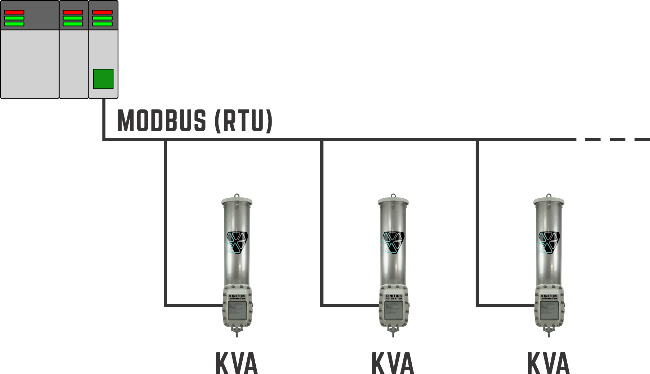
Diagram of a Modbus RTU network connecting a controller to three KVA38 valve actuators
A Modbus RTU network with multiple KVA38 field devices

— Why connect the serial port

One connection, the whole picture

The serial port provides access to operating data, diagnostics, configuration, and control through one communications interface.

Benefits of the serial port connection:

  • Real-time health monitoring. The health status of the KVA38 can be monitored remotely over the Modbus network.
  • Condition-based monitoring of connected equipment. The KVA38 continuously monitors the attached valve, not just the actuator.
  • Remote unit configuration. Less need for physical access during commissioning, adjustment, and service.
  • Error-free positioning. Modbus position commands avoid the noise, offset, and span-calibration limitations associated with analog control signals.
FeatureAnalog connectionModbus connection
SignalOne command or feedback value per signalCommands, feedback, status, diagnostics, and configuration
Wiring and I/ODedicated wiring and I/O terminals for each signalMultiple KVA38s can share one network port
DiagnosticsLimited visibility into device conditionActuator and valve health available remotely
ExpansionAdditional data requires additional signal wiresAdditional data available without additional signal wires

— Actuator health

Advance warning from the actuator

The health status of the KVA38 can be remotely monitored over the Modbus network.

  • Fault flags. A non-zero value on any one of the fault flags indicates a fault condition.
  • Degraded, not down. Several faults are non-critical and permit the actuator to continue functioning in a degraded state.
  • Time to plan. Annunciation of the faults to the relevant operations and maintenance teams can be used to set up a service event that avoids, or at least minimizes, expensive downtime.

— Valve health

It watches the valve, not just the actuator

The KVA38 continuously monitors the attached valve. That makes condition-based monitoring of connected equipment possible from the actuator itself.

  • Identifies common failures. Detects conditions such as blockages and seized valves that prevent the valve’s proper movement or closure.
  • Provides specific fault flags. Fault conditions are reported through registers, giving E&I technicians better information on what is actually wrong.
  • Faster troubleshooting. Helps technicians know what they are dealing with before they arrive at the valve.
  • Reduces unnecessary field work. Better fault information can help determine whether the issue is actuator-related, valve-related, or infrastructure-related.

— For operations teams

Fewer field visits, less downtime

Set up annunciation of the specific faults to the relevant operations and maintenance teams to get the benefit of faster repairs and less downtime.

  • Fewer unnecessary trips. Fault information helps determine whether an issue is actuator-related, valve-related, or infrastructure-related before anyone is sent out.
  • Prepared technicians. Specific fault flags tell E&I technicians what they are dealing with before they arrive at the valve.
  • Planned service instead of outages. Non-critical faults let the actuator keep working in a degraded state, so a service event can be set up that minimizes, or even avoids, downtime.
  • Less time on site for setup. Remote configuration reduces the need for physical access during commissioning, adjustment, and service, particularly where actuators are distributed across a facility or installed in difficult-to-reach locations.

Why it matters

Know what is wrong. Know where. Before you roll a truck.

Health data from the KVA38 valve actuator turns an unplanned call-out into a planned service event.

— Getting connected

Connect to the KVA38

Modbus RTU

To access the full suite of data and configuration settings, connect the KVA38 to a Modbus RTU compatible device. Follow industry best practices when wiring the network: shielding, grounding, daisy-chaining, and termination resistance.

Many actuators, one network

Multiple KVA38 units can be connected to the same Modbus network. Set a unique Modbus slave address for each KVA38, one at a time, using the main RTU or a field terminal running the Kinitics Actuator Toolkit software.

Configure remotely

Once connected, Modbus can be used for span calibration, function checks, and setting maximum lift height. Refer to the product manual for Modbus registers, communications settings, and detailed implementation guidance.

For more detail, download the application note, Leveraging Data from the KVA38 (PDF).

See the KVA38 valve actuator

Specifications, certifications and field results for the actuator behind this data.